The project settings control how your report is tagged and how your ESEF package is built. Only project admins can change them.
- Open your project.
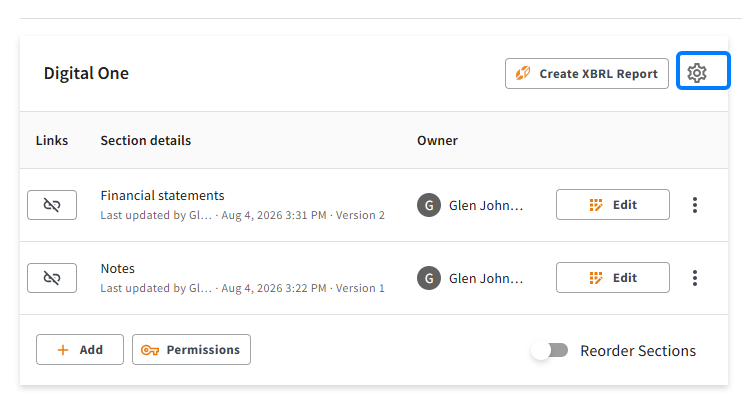
- Click the settings (cog) icon in the Vicosight Core area to open Vicosight Core Settings
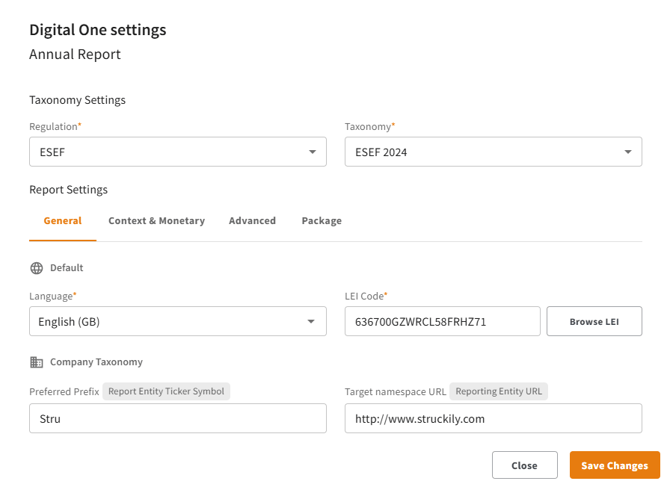
- Fill in the settings below and click Save.
Setting
What to enter
Regulation
ESEF
Taxonomy
Your ESEF taxonomy. For ESEF 2025, choose IAS 1 or IFRS 18, whichever your financial statements follow. Only taxonomies for the chosen regulation are listed
Language
The language your report is written in
LEI
Your company's Legal Entity Identifier. You need it to generate the ESEF package
Preferred Prefix and Target namespace URL
Both start empty. Use your ticker symbol as the prefix and your company website address as the namespace. They're used to name your own extension concepts, and can't be changed once you've created one
Reporting period
The start and end dates of your financial year. Every tag uses this period unless you change it for that tag
Currency, scale and decimals
The defaults every new number tag starts from, for example SEK in millions. You can also set the default number format
Calculation settings
How rounding is read: round to nearest (the default) or truncation. Match how your figures were prepared
Taxonomy Package
Metadata for your ESEF package, filled in with defaults from your project
Leave the advanced settings as they are unless you know you need to change them.
If you change the taxonomy after tagging has started, you're warned that existing tags may need to be checked again.